This Summer, I Automated My Student Job
During the Covid epidemic, many freelance journalists lost most of their usual work. To help them keep some income, the Association of Professional Journalists (AJP) launched a paid initiative: journalists could write an article, publish it on the association's website, and get paid for it. My summer job was to take what they sent in — Word documents and photos, straight from each journalist — and turn it into something ready to publish online.

Run the program only once
The structure of the folder I received was as follows:
Folder I received
├── Journalist 1
│   ├── article.docx
│   ├── image 1.jpg
│   ├── image 2.jpg
│   └── image 3.jpg
├── Journalist 2
│   └── ...
├── Journalist 3
│   └── ...
└── ...
I didn't want to run the program every time I needed to edit an article or image. That's why I decided to automate the process of finding the files. You can easily do this in python with os.scandir(<path>). Then filter the files based on their extension.
import os

DIRECTORY: str = "<path_to_the_folder_I_received>"
image_extensions: List[str] = ['.png', '.jpg', '.jpeg', '.tiff', '.bmp', '.gif']

# list of directories named after journalists
directory_list: list = [dir for dir in os.scandir(DIRECTORY) if dir.is_dir()]

for dir in directory_list:
    journalist_name: str = dir.name

    # get the lists of articles & images
    docx_file_list: list = [f for f in os.scandir(dir) if ".docx" in f.name]
    images_list: list = [f for f in os.scandir(dir) if f.name.lower().endswith(image_extensions)]
How to format articles
On the first day, I learned what I had to do with the word (.docx) files I received. Here's what I had to do:
- Change the format of subtitles or questions:
- Subtitles in regular articles need to be written like this:
{{{**subtitle}}} - Interviews with questions should be surrounded like this:
{{question}}
- Subtitles in regular articles need to be written like this:
- Add blank lines between paragraphs
- Remove or add white space where necessary
What this looks like in python:
import docx

# open the document
doc = docx.Document( <doc_path> )

# format the file properly for a regular article
article: str = format_article(doc)
interview: str = format_interview(doc)

# remove or add white space where appropriate
article: str = correct_white_space_article(article)

# save the changes to a file
with open(dir.path + "\\article.txt", 'w', encoding='utf8', errors='ignore') as f:
    f.write(article)
with open(dir.path + "\\interview.txt", 'w', encoding='utf8', errors='ignore') as f:
    f.write(interview)
Since I couldn't find an easy way to distinguish interviews from regular articles, I decided to create both formats in parallel. When publishing the article on the association's website, I chose the most appropriate one.
Of course, I had to write these functions myself. Since I don't want to go into too much technical detail in this article, I'll leave their implementation aside.
How to format images
As for the images, my job was to reduce their size and pixel density. We had to do this because the smaller the image, the faster it loads. This improves both user experience and SEO (search engine ranking).
from PIL import Image

# open the image and compute the new size
img = Image.open( "<image_path>" )
new_size = [int(x / img.size[0] * 1000) for x in img.size]

# resize and reduce pixel density (dpi)
img.resize(new_size, Image.ANTIALIAS).save("<new_path>", dpi=(72,72))
Get the metadata from the images
Some images have their description and copyright information in the image metadata. I wrote a script to put all of this metadata together into one file. After uploading the files to the website, I just had to add the description manually. I could also have scripted this task. However, I would have wasted more time automating it than doing it myself.
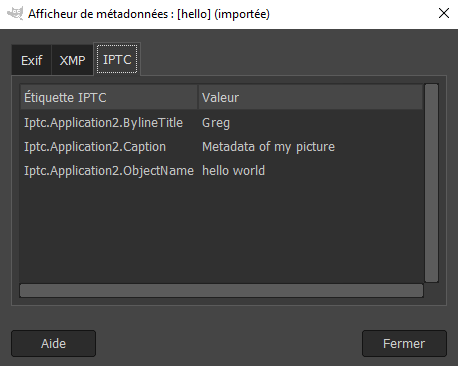
My boss told me that only Exif and IPTC data was important, so I only extracted these. Since the metadata is encoded in binary in the image, I also needed to convert it to utf-8 and remove illegal characters.
from PIL import Image, IptcImagePlugin


try:
    metadata_iptc: dict = IptcImagePlugin.getiptcinfo(img)
    metadata_exif: dict = img.getexif().__dict__['_info'].__dict__['_tagdata']
except: metadata_iptc = None

metadata_text = img.filename + '\n'

try:
    metadata_text += '\n'.join(
        f"{key} -- " + item.decode('utf8').replace('\x00', '') if type(item) is bytes else
        f"{key} -- {item}"
        for key, item in metadata_exif.items()
    )
except: pass
try:
    metadata_text += '\n'.join(
        f"{key} -- " + item.decode('utf8').replace('\x00', '') if type(item) is bytes else
        f"{key} -- {item}"
        for key, item in metadata_iptc.items()
    )
except: pass

# save the metadata in a file
with open(dir.path + "\\metadata.txt", 'w', encoding='utf8', errors='ignore') as f:
    f.write( "\n\n----------------\n\n".join(metadata_list) )
Conclusion
By the end of the summer, this pipeline — scanning folders, reformatting text, resizing images, and pulling metadata — turned a job that used to take most of an afternoon per batch of articles into something I could kick off and walk away from. It didn't pay any better, but it replaced the most repetitive and error-prone parts of the work with a five-minute wait.
Looking back, I'd tighten a few things: swap the bare except blocks for something that actually tells me which file failed and why, and use pathlib instead of hardcoding Windows-style \\ paths so the scripts would run anywhere. But for a two-week job, it did exactly what it needed to — and it's still one of the automation projects I'm proudest of, because it wasn't built for my own workflow, it was built for someone else's deadline.